
Best for: non-urgent work
Wait for the reset shown in your account
The warning and Settings > Usage show when included usage should return. Waiting is the cleanest answer when the task is not urgent and you do not want additional metered spend.
That message can mean you exhausted the current 5-hour session allowance or the separate weekly allowance on a paid plan. Waiting for the wrong reset will not help. Check the exact warning, confirm the timestamp in Settings > Usage, and keep both limits visible while you work so the next cutoff does not arrive without warning.
Quick answer
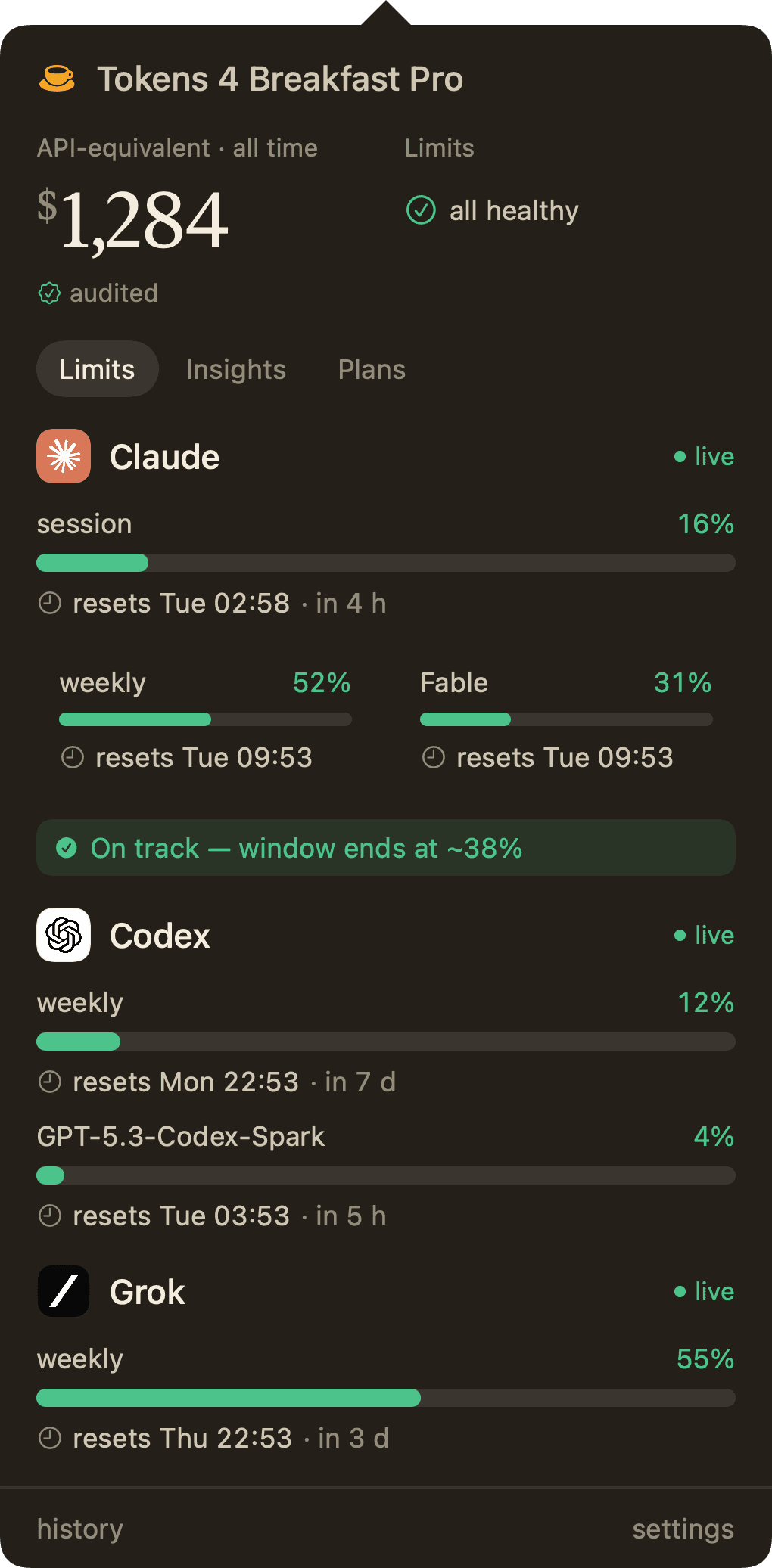
When Claude says your usage limit was reached, first open Settings > Usage and identify the limit named in the warning. The session allowance resets every five hours. Paid plans also have a separate weekly allowance that resets at a fixed day and time assigned to your account. Claude on the web, Claude Desktop, and Claude Code share the same subscription allowance, while API-key usage is billed separately. Tokens 4 Breakfast keeps the live percentages and reset times in your Mac menu bar so you can see the cutoff coming before it blocks the next task.
These warnings can look similar, but the right fix depends on which budget ran out.
Product proof
The Limits view keeps Claude's current session and weekly allowance visible without turning usage checking into another browser routine. The signal stays on your Mac and sits beside the other AI tools you use.
Each step stands on its own. Skip to the one that matches where you are.
A 5-hour session limit, a weekly allowance, a conversation-length error, and an API rate limit are different problems. The blocking message normally names the limit and shows a reset time. Capture that wording first. It tells you whether a short wait will restore access or whether the weekly allowance is the real constraint.
On a paid Claude plan, Settings > Usage shows the current 5-hour consumption, time remaining, weekly usage, and the next weekly reset. In Claude Code, /usage shows plan usage and activity. Trust the timestamp in your account rather than a generic reset schedule copied from a forum post.
Claude's session-based allowance resets every five hours. The amount of useful work inside a session is not a fixed message count. Conversation length, attached files, model choice, effort level, tools, connectors, and artifacts can make one session consume the allowance much faster than another.
Paid plans have a second allowance that resets at a fixed day and time assigned to the account. Your reset schedule stays the same regardless of when you begin working. If the weekly allowance is exhausted, a 5-hour session reset will not restore it. Settings > Usage shows the exact weekly reset assigned to you.
Claude on the web, Claude Desktop, and Claude Code draw from the same subscription allowance. A heavy coding session can leave less room for chat later, and the reverse is also true. API-key usage is separate and billed by token through the Claude Console or the cloud provider attached to that key.
Start a new conversation when the job changes, keep project instructions concise, reuse recurring context through Projects, lower effort for routine work, and disable tools you do not need. These actions do not bypass the limits. They keep more of the allowance focused on finished work instead of repeated context and unnecessary tool calls.
Tokens 4 Breakfast places the current Claude session percentage, weekly allowance, and reset countdown in the Mac menu bar. You can see Claude next to the rest of your AI stack, receive a warning before the limit is exhausted, and decide whether to continue, compact the task, or wait before another long run.
Pro tips
None of these actions bypass Anthropic's limits. They reduce repeated context, unnecessary tool calls, and avoidable regeneration so more of your allowance reaches finished work.
The best time to protect the allowance is before a long research, writing, or coding run begins.
Open Settings > Usage before a large task. In Claude Code, run /usage. If the session or weekly bar is already high, you can wait, narrow the job, or postpone a tool-heavy run instead of being stopped halfway through it.
Write down whether you are close to the five-hour session allowance, the weekly allowance, the conversation context window, or an API budget. Each has a different reset and a different remedy. Treating them as one limit leads to wasted waiting and unnecessary upgrades.
Use the reset time shown in your own account. Begin a long code review or research task after enough allowance has returned, and place lighter work near the end of the window. Generic schedules from social posts cannot tell you the reset assigned to your account.
Include the objective, constraints, required format, source standard, and acceptance checks upfront. A precise definition of done prevents clarification loops and full regenerations caused by requirements that appeared too late.
Ask for findings, risks, alternatives, and next actions in one structured request when they depend on the same material. Separate unrelated jobs, but combine closely related questions so Claude does not need several back-and-forth turns to reconstruct the same brief.
Long histories and irrelevant files quietly make every later turn heavier. Keep only the context the current outcome needs.
A conversation that moves from research to travel planning to code carries all three histories. If the next prompt would make sense without the current thread, start a new chat. A fresh conversation reduces unrelated context and usually improves focus as well as usage efficiency.
Point to the specific paragraph, function, slide, or calculation that is wrong. State what must change and what must remain untouched. Regenerating a full deliverable because one section failed spends allowance on work that was already acceptable.
Store stable briefs, policies, product notes, and research sources in a Project when you will reference them repeatedly. Anthropic says reused project content is cached, so only new or uncached portions count when that knowledge is used again.
Use project instructions for the lasting role, tone, rules, and quality bar. Put the current request in the chat and detailed evidence in project files. Temporary instructions left in the permanent brief create extra context and can conflict with later work.
A Project should be a working knowledge base, not a permanent archive. Remove drafts, duplicate exports, and sources that no longer apply. This reduces retrieval noise and lowers the chance that Claude reads irrelevant material into the active context.
For a large report, point Claude to the chapters, pages, rows, or sections that answer the question. Projects can use retrieval to load relevant material from a larger knowledge base. There is no official magic word limit for every file, so relevance matters more than arbitrary splitting.
Model choice, effort, tools, connectors, and artifact generation all affect how quickly included usage is consumed.
Keep a proven outline for recurring reviews, reports, and briefs, then replace only the goal, evidence, and constraints. This reduces prompting detours, and Anthropic says similar prompts used frequently may be partially cached.
Simple extraction, formatting, short rewrites, and straightforward summaries rarely need the deepest reasoning path. Disable extended thinking for mechanical work, then restore it when complex analysis or a high-stakes decision can benefit from the extra reasoning.
Effort level changes usage. Use a lower setting for predictable work such as classification, cleanup, or formatting, and raise it for ambiguous synthesis, architecture, or difficult debugging. The goal is deliberate routing, not permanently choosing the cheapest setting.
Web search, Research, and MCP connectors can add substantial context and tool output. Turn them on for live retrieval or connected actions, then disable them when the source text is already available and the task only needs editing or reasoning.
Use an efficient model for lookups, mechanical edits, and well-specified execution. Reserve the highest-capability model for architecture, hard debugging, nuanced decisions, and other work where deeper reasoning can change the outcome. Check /model for the choices available to your account.
Claude Code exposes commands that show which allowance is running low and what the current session is carrying.
Use /usage to inspect plan consumption before asking Claude Code to explore a repository, run a large migration, or execute a multi-file refactor. The visible bars help you decide whether to begin, reduce scope, or wait for included usage to return.
/clear removes the current conversation history while keeping project instructions and files available. Use it after one task is finished and before the next unrelated job. Save any detail you still need first because clearing the chat cannot be undone.
/compact summarizes the current conversation and frees context while preserving the essential thread. It is the better choice when a long debugging or implementation task is still active and starting over would discard decisions you need.
Run /context to see what the session has loaded. Refer to the relevant file path, function, or a short range of log lines instead of pasting an entire repository file or build log. Specific evidence keeps the session smaller and the answer more precise.
Use /model to select an appropriate model for the next phase. If Claude Code is authenticated with an API key, /cost shows running token and dollar usage for that session. Subscription users should rely on /usage and Settings > Usage for their included allowance.
Choose the least expensive option that keeps the work moving without turning a temporary limit into an uncontrolled bill.
Best for: non-urgent work
The warning and Settings > Usage show when included usage should return. Waiting is the cleanest answer when the task is not urgent and you do not want additional metered spend.
Best for: urgent paid-plan work
Eligible paid-plan users can continue at standard pay-as-you-go rates after included usage is exhausted. Set a monthly cap before enabling credits so a long agentic session cannot create an open-ended bill.
Best for: consistently high usage
A higher plan provides more headroom, but it does not make mixed-topic chats, repeated files, or unnecessary tools efficient. Fix those patterns first, then upgrade if clean sessions still interrupt valuable work often.
Best for: controlled API workflows
API-key usage is billed separately through the Claude Console or a supported cloud provider. This can keep urgent work moving, but it replaces a hard subscription stop with token-based billing. Monitor /cost and the authoritative billing dashboard.
These claims are repeated online, but current Anthropic documentation does not support them as quota-saving rules.
Claim
What is actually supported
Editing can create a cleaner branch, but Anthropic does not state that it reverses allowance already consumed. Use edits for clarity, not as a quota-refund mechanism.
Claim
What is actually supported
Anthropic publishes file and context limits, but no universal 2,000-word rule. Select the evidence the task needs and use Projects or retrieval for larger knowledge bases.
Claim
What is actually supported
There is no documented 15-message or 20-message threshold. Start fresh when the task changes. In Claude Code, compact when the same task continues and context has become heavy.
Claim
What is actually supported
Dictation may help someone give a complete brief in one pass, but a longer spoken prompt can also add more input. Anthropic does not guarantee a quota saving from voice alone.
Claim
What is actually supported
Subscription usage is shared across Claude on the web, Claude Desktop, and Claude Code. Switching devices or surfaces does not create a separate included pool for the same account.
Short, direct answers to the things people ask most about this.
It means the account exhausted either its current 5-hour session allowance or a separate weekly allowance. Read the warning and open Settings > Usage to see which limit stopped the session and the exact time it will reset.
The session-based usage allowance resets every five hours. Paid plans also have a separate weekly allowance, so a five-hour reset will not restore access if the weekly allowance is the limit you exhausted.
It resets at a fixed day and time assigned to your account. That schedule stays the same regardless of when you start using Claude. Open Settings > Usage to see your next weekly reset.
Yes when you use the same paid subscription. Claude on the web, Claude Desktop, and Claude Code count toward the same plan allowance. API-key usage is separately metered and billed.
Long conversations, large files, higher effort, expensive models, Research, web search, connectors, artifacts, and agentic tool loops can all consume more of the allowance. Claude does not promise one fixed message count for every session.
Yes. Tokens 4 Breakfast shows the current session percentage, weekly allowance, and reset times in the Mac menu bar, with optional warnings before a limit is exhausted.
No. A new chat starts with a clean conversation context, which can make later turns lighter, but it does not reset the account's five-hour or weekly allowance. Only the reset time shown in Settings > Usage restores included plan usage.
First confirm whether the warning names the five-hour session allowance or the weekly allowance. They have different reset times. If the displayed time has passed, refresh Claude, check Anthropic's service status, and contact support if the account still shows the old state.
No single public message count applies to every Pro session. Anthropic says usage varies with message and file length, conversation history, model, effort, tools, connectors, and artifacts. Settings > Usage is the reliable view for your account.
Eligible paid-plan users can enable usage credits and continue at pay-as-you-go rates. You can also wait for the displayed reset or use separately billed API access. Set a spending cap before turning a hard stop into metered usage.
Verified sources
Current primary documentation used for the time-sensitive details on this page.
Privacy-first analytics
We use optional analytics to understand aggregate website usage and make the product easier to discover. Google Analytics only loads after you accept. No account data, app data, or personal AI usage is sent, and you can change your choice anytime.
Read the privacy policy